Stocktwits Discord Integration: What Can You Connect?
Check what you need to send Stocktwits content to Discord, when a webhook helps, and how to set up separate stock alerts with News.gg.
 News.gg Team
A Stocktwits-to-Discord integration needs an approved source of Stocktwits data and a delivery method such as a Discord webhook. Confirm approved data access and redistribution first. For price moves, earnings, or filings, News.gg provides its own alerts through MarketPulse.
Choose how the information gets to Discord
| Goal | What to set up |
|---|---|
| Discuss a public message you found on Stocktwits | Share the public link manually and make clear who authored it. |
| Deliver Stocktwits data automatically | Start with Stocktwits for Developers. Confirm that your access permits Discord redistribution before selecting a connector. |
| Follow a publisher such as FinancialJuice | Check the publisher’s current Discord or feed options directly. FinancialJuice has announced its own Discord server. |
| Receive stock moves, earnings or SEC filings | Configure the relevant alert in News.gg MarketPulse. This is a separate alert source from Stocktwits. |
Stocktwits’ terms for automated access describe authorized APIs, widgets, and developer offerings. Use the approved route for the data you need.
Test a stock alert channel
Open Crypto / Stocks / Forex in your News.gg server dashboard. Search for Stock Price Alerts, choose a destination, and review the ticker and threshold settings. For a channel organized around market sessions, review AI Market Insights and its scheduled pre-market and after-hours briefings.

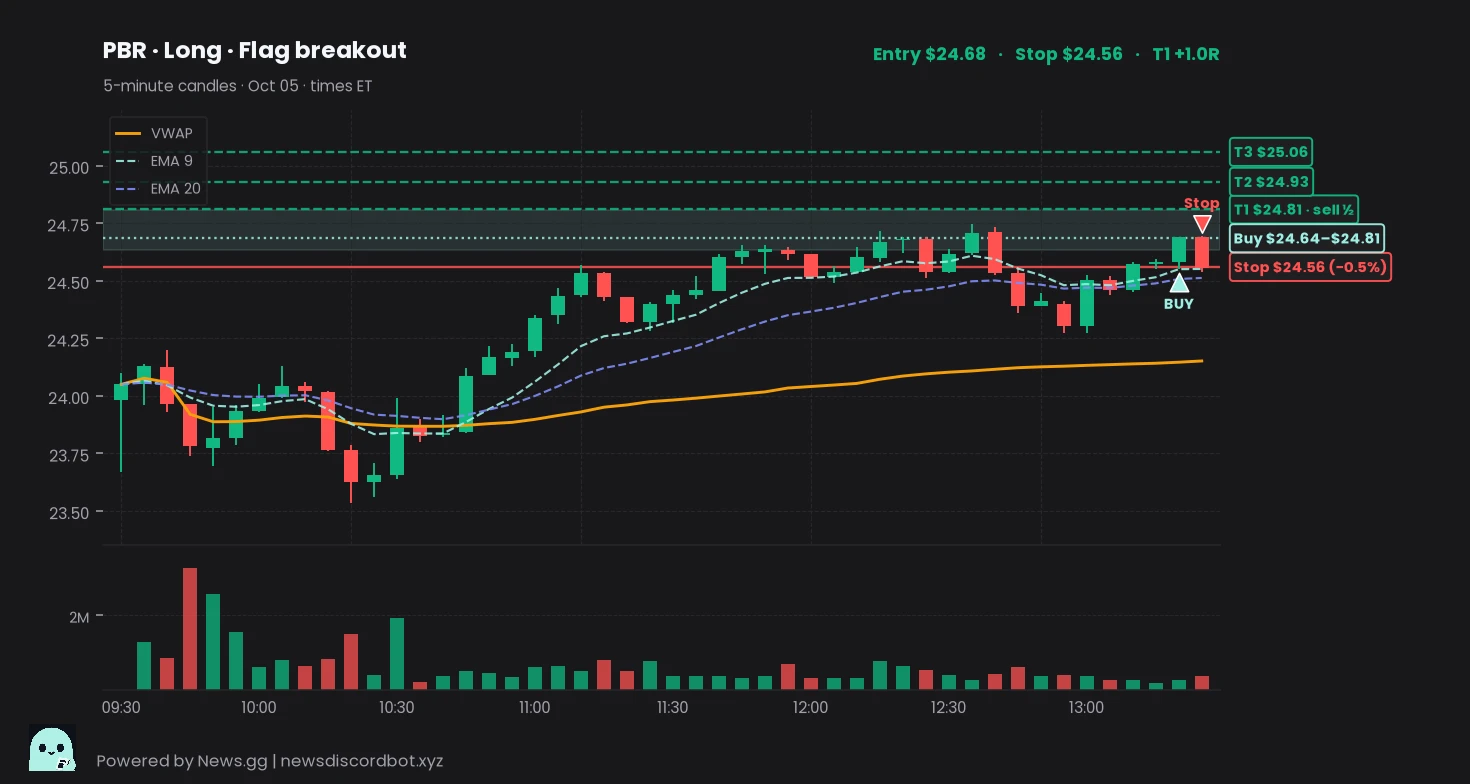
PBR · Long · Flag breakout
Historical alert replay. The chart shows the setup, its marked levels, and where the stop was hit.
- Entry
- $24.68
- Stop
- $24.56
- Targets
- $24.81 · $24.93 · $25.06
See the stock market setup walkthrough for the dashboard flow or the crypto alerts guide if your community follows crypto price changes.